Pog Pumpkin: A Video-Game Style Font for Bold Creators
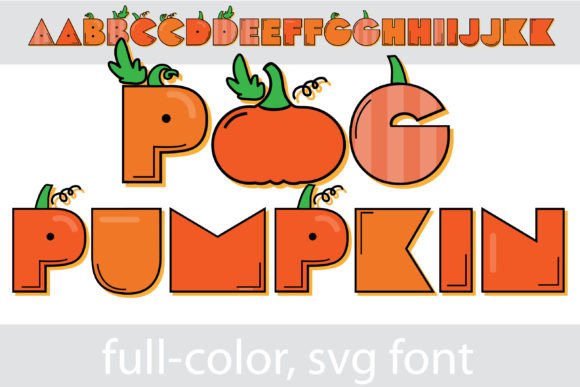
If you're looking for a creative font that breaks the mold and injects a heavy dose of nostalgia into your work, Pog Pumpkin might be exactly what you need. This isn't just another decorative typeface; it is a full-color OpenType (SVG) font that integrates actual pumpkins into a video-game style lettering system. For designers, crafters, and entrepreneurs, this offers a unique opportunity to create standout visuals without the need for complex layering or external image editing. It captures a specific vibe—playful, retro, and seasonal—that can be difficult to achieve with standard black-and-white typography.
The Visual Appeal and Unique Personality
At its core, Pog Pumpkin is a display font designed for impact rather than long-form reading. The defining characteristic is the integration of pumpkins into the letterforms. Imagine the blocky, bold aesthetic of arcade game headers, but filled with the vibrant orange, green, and texture of seasonal gourds. Because it utilizes SVG technology, the font retains high-resolution details and gradients directly inside the text file. This means you get a polished, three-dimensional look straight out of the box.
The personality of this typeface is undeniably playful and energetic. It leans heavily into the "fun" side of design, making it a perfect asset for projects that don't take themselves too seriously. It feels nostalgic, harkening back to pixel art and 8-bit adventures, yet the full-color rendering gives it a modern, high-quality finish. For anyone working on a project that requires a "spooky but cute" or "retro gaming" aesthetic, Pog Pumpkin delivers a strong visual punch that standard serif or sans serif fonts simply cannot replicate.
Practical Applications: Where Pog Pumpkin Shines
Understanding where to use a premium font like this is just as important as liking the design. Because Pog Pumpkin is a heavy, textured display font, it excels in specific scenarios. It is not a tool for body text; rather, it is the headline act.
Here are some of the most effective ways to utilize this asset:
- Branding and Packaging: If you run a seasonal business, a bakery, or a gaming channel, this font can become the centerpiece of your logo design during the fall months. It works incredibly well on packaging design for treats, snacks, or merchandise where shelf appeal is critical.
- Digital and Web Design: Use it for hero images on landing pages or as the main text for digital invitations. It is particularly effective for "Sale" banners or event headers where you need to grab attention immediately.
- Social Media Graphics: In the fast-scrolling world of Instagram or TikTok, a unique visual stopper is gold. Pog Pumpkin creates instant engagement for holiday campaigns, stream overlays, or YouTube thumbnails.
- Crafting and Print: For hobbyists using software like Silhouette Studio, this font is ideal for creating stickers, t-shirt transfers, and greeting cards. The full-color nature means you don't have to manually color in your designs.
Technical Realities: Installation and Compatibility
One of the most common questions regarding full-color fonts is how to install and use them. The good news is that an SVG font like Pog Pumpkin installs exactly like any standard .otf file. You simply add it to your font manager—whether that is FontBook on a Mac or the Control Panel on Windows.
However, the visual output depends entirely on your software. This is a crucial detail for maintaining your workflow efficiency. You will know your program supports full-color SVG typography when you type and see the colors immediately. If you open the font in a program that does not support SVG, the text will appear as a solid black silhouette. While this might sound like a limitation, it actually ensures the font is backward compatible; you can still use the shape of the letters even if the color data isn't rendered.
Currently, major creative suites support this technology. If you are using Adobe products (Photoshop, Illustrator, InDesign), Quark, or Inkscape, you are good to go. These programs can interpret the vector and color data, allowing you to scale the font to any size without losing quality. This vector-based scalability is a massive advantage for designers who need to move from a small business card to a large poster format.
Strategic Usage and Design Tips
To get the most out of Pog Pumpkin, you need to treat it as a focal point. Because it is a "loud" font, pairing it requires a delicate balance. You generally want to avoid pairing it with other decorative, handwritten, or script fonts, as this will create visual chaos. Instead, lean on clean, modern typography for your supporting text. A simple sans serif font or a minimal geometric typeface provides the necessary breathing room for the pumpkin letters to stand out.
Consider the hierarchy of your design. Use Pog Pumpkin for the H1 or the main headline, and then switch to a standard, legible font for the sub-headers and body copy. This ensures that your message is communicated clearly while still maintaining that festive, branded look.
Furthermore, pay attention to the background. Since the font features rich colors (oranges, greens, shadows), placing it on a very busy background might reduce legibility. Solid colors or subtle textures usually work best to let the details of the SVG letters pop. Whether you are a small business owner looking to refresh your October marketing materials or a content creator wanting to add a bit of gaming flair to your channel, Pog Pumpkin offers a specialized, high-quality solution for modern typography needs.